
Features
Features
Collect places, plan tours with stops, keep the holiday year in view. All in one portal that everyone travelling along can see.
Start for free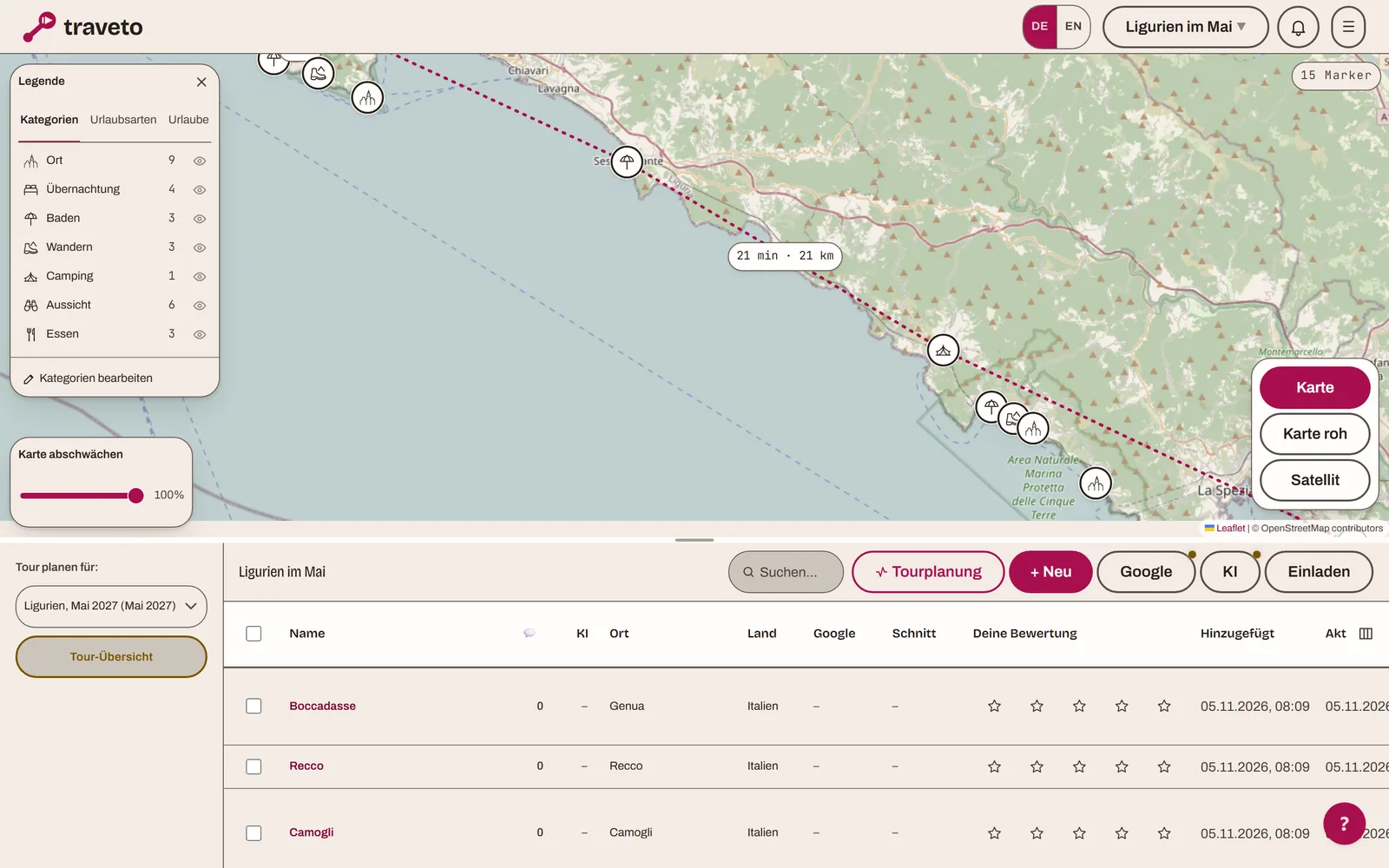
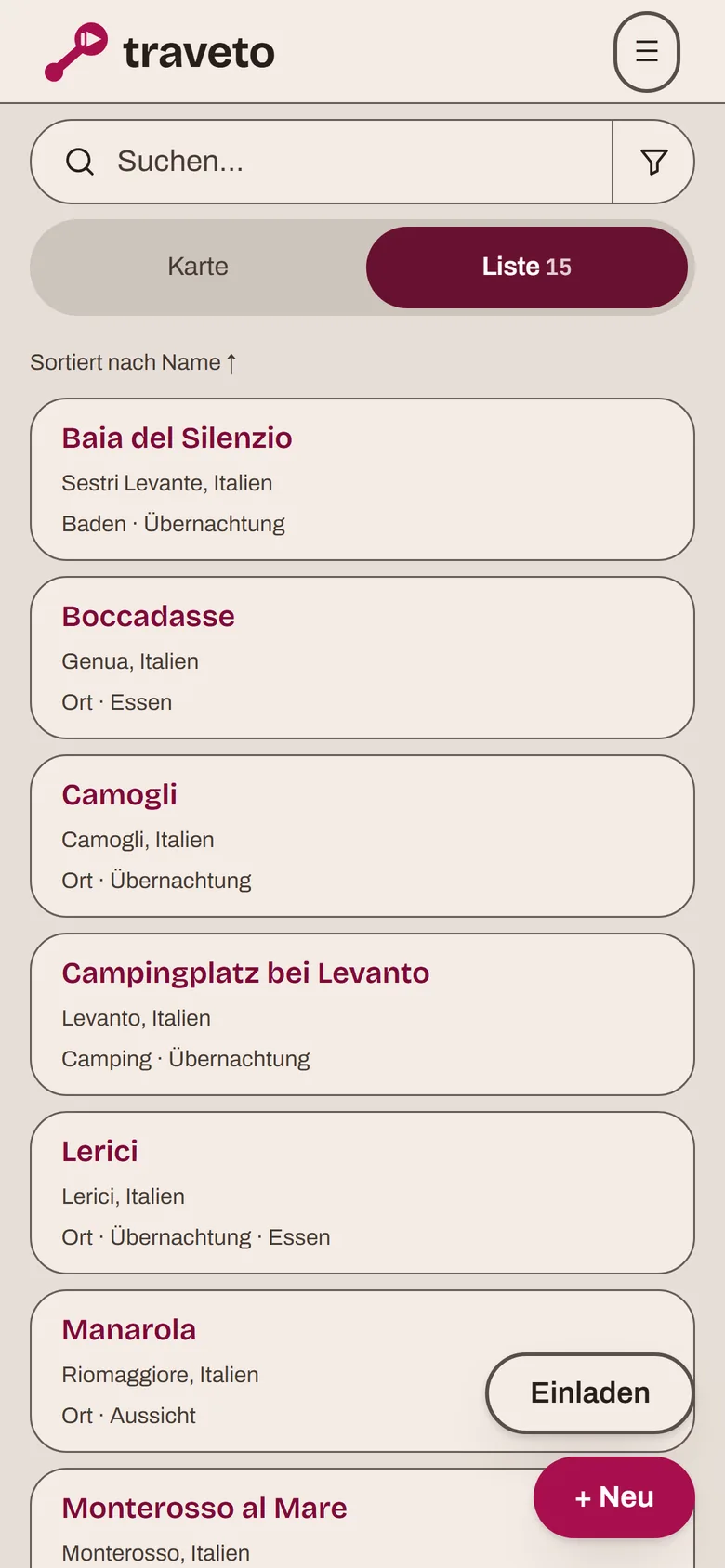
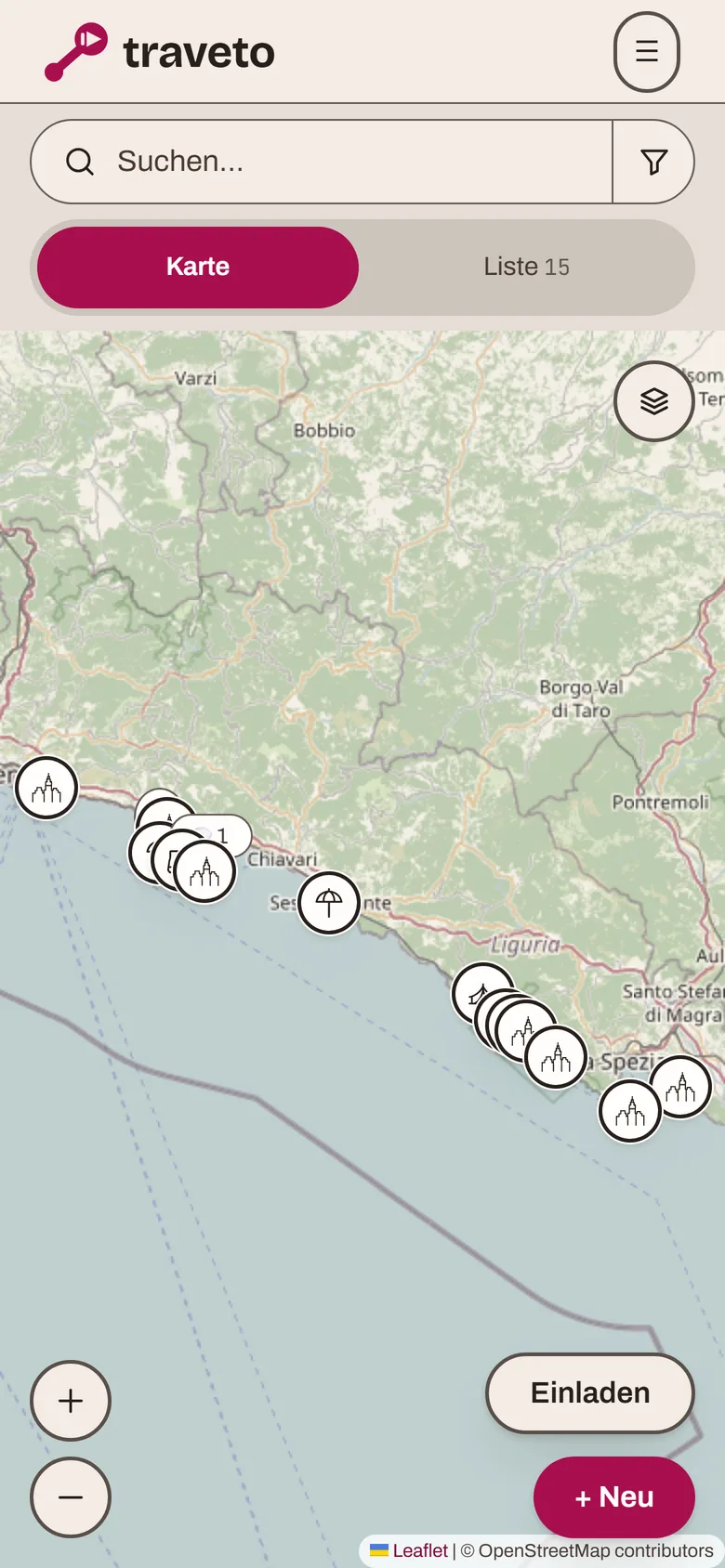
Collect places and see them on the map.
Every place someone adds gets a point on the map. That answers the question "is that far?" before anyone asks it.
- Add by name or linkA name and a town are enough. Or paste a link shared from Google Maps, even one that only holds a position.
- Data from GoogleFor places that exist on Google, the address, rating, photos and map link are filled in when you add them.
- Categories with a colour or symbolFreely definable, with 81 symbols to choose from. The main category sits in the map marker, others form a ring around it.
- Legend, filter and searchOne tap in the legend shows a single category, holiday or type of travel. The search understands terms such as city:Camogli or category:beach.
- One place in several portalsPlaces can be copied or moved into another portal of your own.
Plan holidays and tours.
A holiday has a period and an order. Places become numbered stops within it, and between two stops you see how far it is.
- Stops with dates and notesEach stop is an overnight stay or a break. Breaks get their own, smaller marker on the map.
- Driving time and distanceBetween the stops and from your own address, calculated for a car. On legs of more than three hours without a break, Traveto reminds you to plan one.
- Several holidays in one portalEach with its own period and its own colour or symbol. One place can belong to several.
- Take it with youThe stops as a GPX file for sat navs and tour planners, or as a file for Kurviger. And a trip summary to print as a PDF.
The holiday year in view.
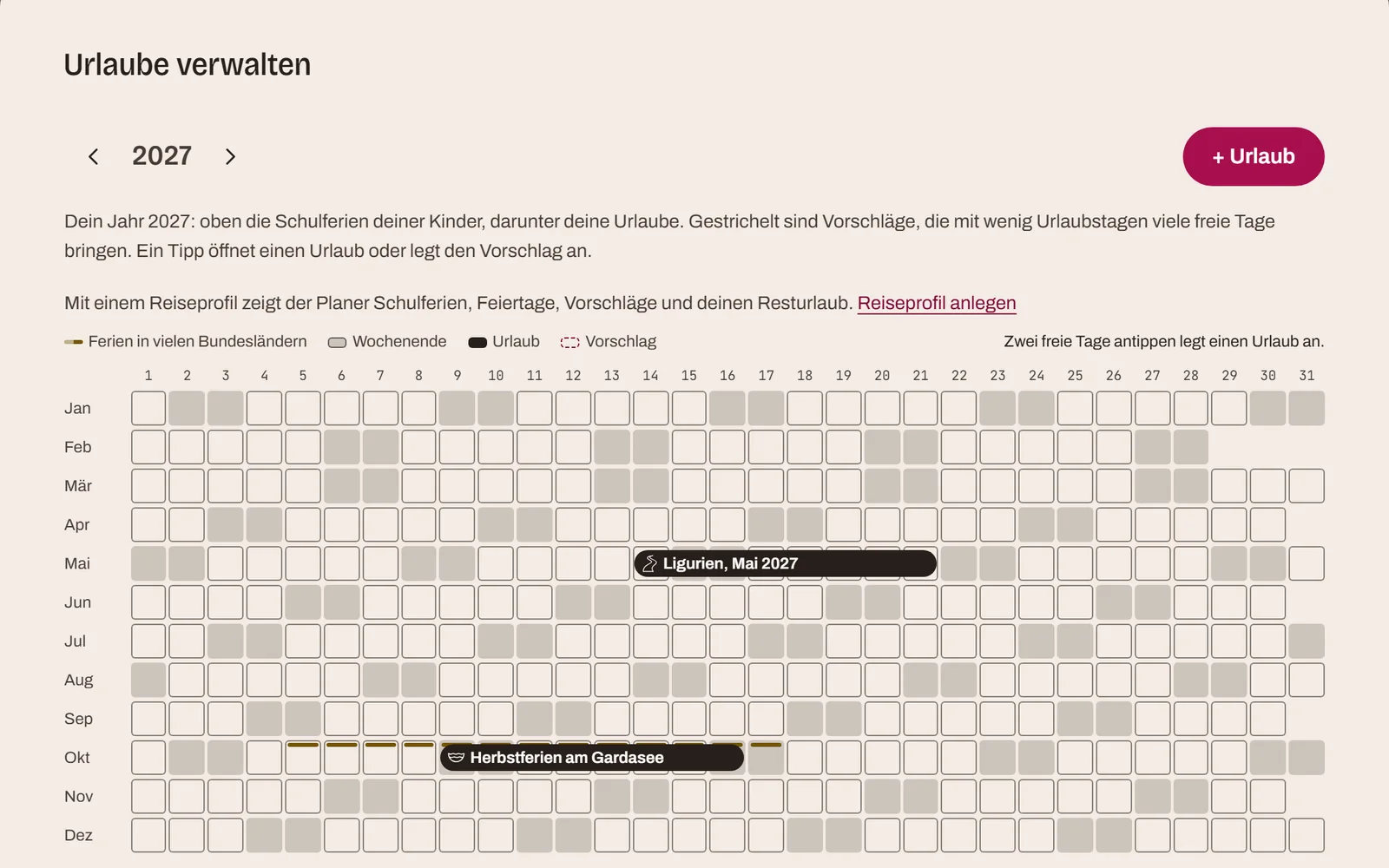
The holiday planner shows a whole year: your holidays, school holidays and public holidays. On wide screens as a wall planner, on a phone as a list of months.
- School and public holidaysFor Germany, Austria, Switzerland and the Netherlands, by state or region. The data comes from the OpenHolidays API.
- A holiday in two clicksTwo clicks on free days create a new holiday.
- Travel profileWho travels along, and how many days of leave does each person have? The profile needs no names or dates of birth and belongs to your account, not to the portal.
- Remaining leave and suggestionsThe planner works out the leave days that are left and suggests periods in which a few days of leave give you many days off.
Plan together.
A portal belongs to one person, and everyone they invite works in it. Everyone sees the plan as it stands.
- Invite by emailAn invitation is valid for 24 hours. Invitations you receive have their own overview.
- Owner and membersMembers add places, change them and comment. Only the owner can release the portal as a public map.
- Note, comments, ratingsOne formatted note per place for everyone. Comments can be pinned or copied into the note. Everyone rates for themselves.
- NotificationsThe bell shows new places, comments and ratings by others, and can be muted per person and portal.
- FriendsSend places to friends. They land in their inbox, and your friends decide which portal to add them to.
- Share without an accountA trip summary can be shared as a link. A whole portal can be released as a public map, which shows only the names, categories and positions of the places.
AI where it saves work.
The AI makes suggestions. It decides nothing, and you should check what it gives you, such as opening hours or ferry timetables.
- Discover within the map viewYou choose the area, and Traveto searches it via Google or by AI for places that suit the portal.
- Suggestions and assessmentFor a place, the AI suggests destinations nearby and assesses whether it suits your trip.
- Packing suggestions and summarySuggestions for the packing list by destination and length of stay, and a summary of the holiday as text.
- With Claude or ChatGPTConnected to an AI assistant, you add places, holidays, to-dos and packing lists in conversation. The assistant acts with your permissions and only when you ask.
Packing lists and to-dos.
Packing lists and to-dos belong to your account and are personal. Anything everyone should see, such as who brings the stove, is better placed in the note on a place.
- Packing listsWith templates, for example for a beach or a city break, and a weight for each item.
- To-dosWith a due date. At the time you set, a reminder arrives by email.
In the browser, on a phone, and soon as an app.
Today Traveto runs in the browser, on a computer and on a phone. Apps of its own are in the works and not yet available.
- BrowserAt app.traveto.app, with nothing to install. On a phone the map comes first, and places open as a sheet from below.
- Web appIn the phone's browser you can add Traveto to the home screen, and it then opens like an app.
- Android and iOSIn developmentApps for Android and iPhone are being built from the same application. They are not in any store yet.
- TelevisionIn developmentA view for televisions with Android TV and Google TV: the places of a trip on the big screen, videos about them, sign-in with a QR code on your phone. So far a prototype.
How planning differs from one kind of trip to the next is covered in the magazine: holidays with friends, motorcycle tours, caravan holidays and hotel holidays.
Frequent questions
What people want to know before their first portal.
What does Traveto cost?
An account is free. With it you see every portal you are invited to and plan along in portals whose owner has a subscription. In a portal of your own you can collect up to 10 places without a subscription. To collect more places and plan trips, you need one of two plans: Expedition at €7.90 a month or €79 a year, and Atlas at €14.90 a month or €149 a year. All prices include VAT, with no further costs. The annual plan costs the same as ten monthly payments. Expedition includes three portals of your own, 25 new places, 20 map searches and five AI suggestions per day. Atlas includes ten portals, 100 new places, 50 map searches and 20 AI suggestions per day. Both include tour planning, the trip summary, export, distance from your own address, comments and ratings. The full list is on the subscription page in the app, and the usage page shows how much of it you have used.
Does everyone travelling along need an account?
Anyone helping to plan needs an account and an invitation to the portal. Anyone who only wants to look gets a link to the trip summary and needs no account.
Who is allowed to change what?
There are two roles. Members add places, change them and comment. The person who owns the portal can also release it as a public map. There is no read-only role; anyone who should only look gets the link to the trip.
What sets Traveto apart from a shared list or a group chat?
Every suggestion is a place on the map rather than a message in a thread. Note, comments and ratings stay with the place, and the order of the trip is in the stops. Two weeks later you can still find what was discussed.
Can several trips run at the same time?
Yes. A portal can hold several holidays, each with its own period, its own colour or symbol and its own stops. One place can belong to several holidays.
Does the driving time work out differently with a caravan or a motorcycle?
No. Traveto calculates driving time and distance for a car. With a caravan or motorhome it usually takes longer, so allow extra time. On legs of more than three hours without a break, Traveto reminds you to plan one.
Can I get the route onto my sat nav?
The stops can be exported as a GPX file with waypoints, which common sat navs and tour planners can read. For Kurviger there is a file of its own with preferences such as curvy or fast. The trip can also be summarised as a PDF.
What is AI used for, and does it decide anything?
For suggestions about a place, the assessment of whether it suits the trip, discovering places within the map view, packing suggestions and the trip summary. It decides nothing. What it gives you is a suggestion you should check.
Where do the ratings and photos for a place come from?
For places that exist on Google, the rating, the number of reviews, photos and the map link are filled in when you add them. For places with their own website, Traveto also takes over the title and description of the page.
Is there a Traveto app?
Not yet. Apps for Android, iPhone and televisions are in the works but not available in any store. Until then Traveto runs in the browser and can be added to the home screen of a phone as a web app.
Can I use Traveto with Claude or ChatGPT?
Yes. Through a connection based on the Model Context Protocol, the assistant adds places, holidays, to-dos and packing lists when you ask. It acts with your permissions, and the limits of your plan apply.
Does Traveto store my password?
Sign-in runs through a separate sign-in service that we operate apart from the application. It stores the password only as a hash; the application itself never sees it. The account can be deleted from within the application.
Is Traveto available in English?
Yes. The language can be switched between German and English in the application. The choice is saved to your account and also applies to emails.
The next trip starts with one place.
Die Ersten dazuholen könnt ihr, bevor irgendetwas feststeht.
Start for free